


On this page
All about Public Static IP
Public Fixed IP – Light France Offer
Activate a Public Fixed IP on your Light France plan, via API or directly from our SIM management platform Auriga.
What is a Public Fixed IP?
A Public Fixed IP is a unique and permanent Internet address assigned to a SIM card. Each SIM receives its own public IPv4 address, without NAT and without IP sharing. This allows remote access to connected equipment without any change of IP address.
What is a Public Fixed IP used for?
- Managing M2M equipment remotely
- Enabling secure connections (VPN, monitoring, remote access)
- Hosting a service or server accessible from the Internet
APN used for the Public Fixed IP
When a Public Fixed IP is activated, the SIM must use the dedicated APN: data.com.
Without a Public Fixed IP, the default APN for Light offers is orange.
Network compatibility
Compatible with 3G, 4G and 5G NSA.
When should the APN be changed?
- Immediately after activating the Public Fixed IP (via Auriga or API)
- Before the device attempts its next data session
- If the device was already connected, a reboot may be required
How to activate the Public Fixed IP
From the Auriga portal
- Select the relevant SIM
- Activate the Public Fixed IP option
- The assigned IP address appears in the SIM dashboard
- Configure the data.com APN on the device
Via API
- Enable or disable the option SIM by SIM
- Configure the data.com APN on the device
Availability of the option
Available for Light France offers, for M2M Advanced and M2M Start plans (bundle or pay‑as‑you‑go).
Retrieving the IP address
There are 3 ways to retrieve the SIM’s IP address:
- In the information pane in the Line Details in Auriga
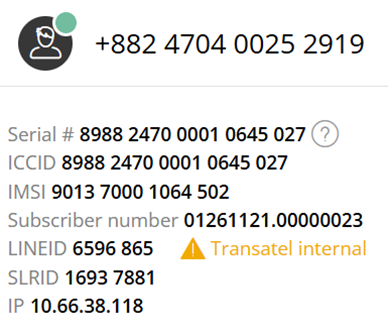
- Using the Single IP Report
The IP address assigned to the SIM is available in the Single IP Report (see here).
- Querying the IP from a device (even if it’s not the destination device)
Actions required after activation
- A device reboot may be needed if the SIM was previously connected
- Ensure that the APN data.com is correctly configured on the device
Limitations
- Not compatible with plans that include a data speed reduction (FUP)
- Not compatible with the SDTR (Real-Time Data Supervision) option