


On this page
Search bar & Smart Search
Search your lines in Auriga: search bar and Smart Search
Auriga lets you find your lines quickly, either with the search bar or, in beta, by asking a question in plain language with Smart Search.
Search bar
The search bar can be used to search exact or partial matches.
It will suggest results if you start typing, and went you click enter, it will display the lines that correspond. If there is an exact match, it will directly open the right SIM page.
You can search the following:
- SIM reference: ICCID, MSISDN, IMSI
- device reference: IMEI, EID
- information: exteral reference, meta-data, group, company
- subscriber information: name, email
Smart Search (beta)
Smart Search lets you ask a question about your lines in plain language and get the answer as a chart or a table. You do not need to build a report or a filter by hand.
Smart Search is not a chatbot. It searches your lines based on the fields you can see in your inventory.
Smart Search is currently in beta: its behavior and the questions it supports may still change.
What you can ask about
Smart Search covers:
- the information of your lines (for example status, SIM type, metadata);
- the monthly usage of your lines.
It is useful to get a first level of reporting on your fleet, or to answer simple questions quickly: distribution of your lines, active lines, lines with given attributes.
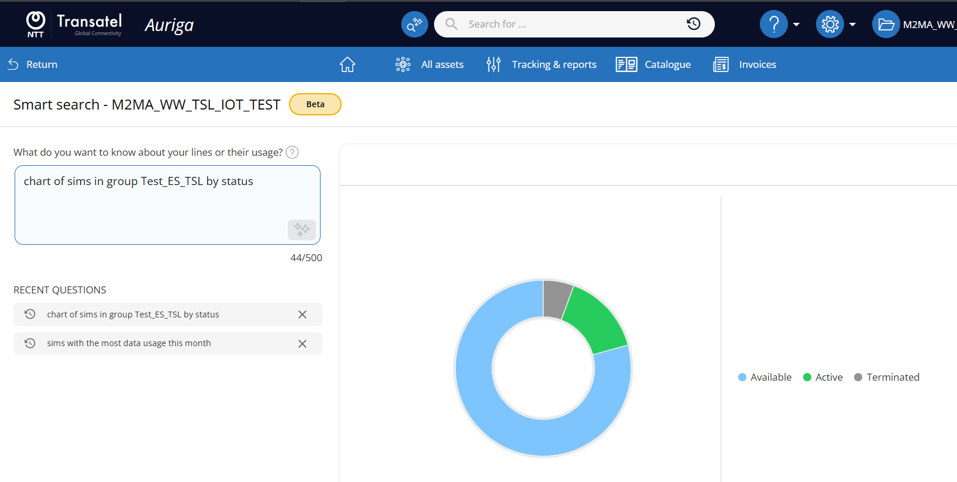
Ask a question
- Open Smart Search. The page title carries a Beta badge.
- Type your question in the field “Ask a question”. Write it as free text, up to 500 characters (a counter shows how many characters you have used).
- Click the sparkle button at the bottom right of the field to run your question.
- The result appears on the right of the question field.

The ? icon next to the field label gives you help.
Examples of questions
| Question | What you get |
|---|---|
| show me the distribution of lines per MVNO | A distribution of your lines by MVNO |
| show me the distribution of lines per status | A distribution of your lines by status |
| show me all active lines | The list of your active lines |
| find the active lines with imsi range between … | Active lines in a given IMSI range |
| show me all active lines without sim type of the customer | Active lines for which the SIM type is not set |
| show me all lines with both metadata keys VIN and … | Lines carrying both metadata keys |
Limits for now
Smart Search cannot:
- answer general questions, give advice or hold a conversation
- explain network issues, billing or contract terms
- use data other than line information and monthly usage (for example usage by day or week, network events or invoices)
Read the result
The result is displayed as a chart or a table. Use the icons at the top right of the result area to switch between the two modes.
- Chart: for example, a donut chart with a legend listing the values (one entry per MVNO).
- Table: the detail of the matching lines.
- Download: use the download icon next to the display icons to export the result.
You can also tell Smart Search how to display the answer, for example by adding “to display as chart type bar” to your question.
Note: Charts are for questions that count or group lines (distributions, totals, breakdowns). Lists of lines are shown as a table
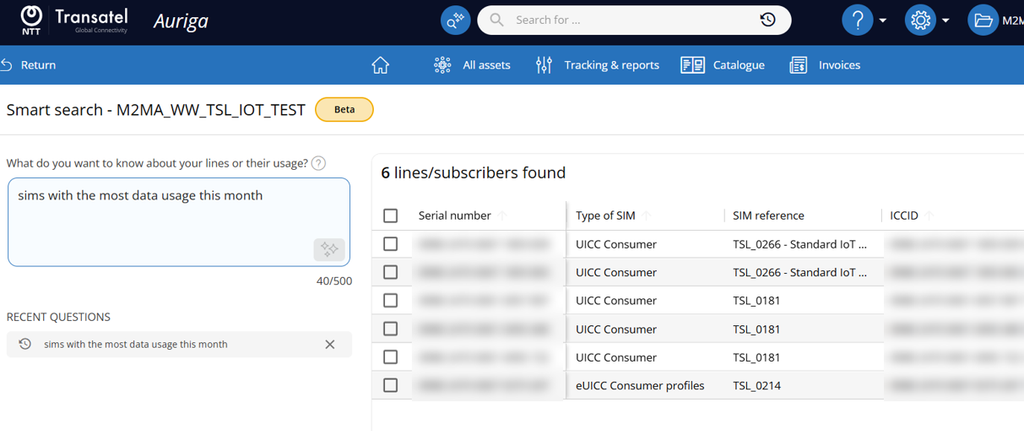
Reuse your recent questions
Your latest questions are listed under the field in Recent questions.
- Click a recent question to bring it back in the field.
- Click the X on its right to remove it from the list.