


Sommaire
Managing RTCP(+) Bundles from the SIM Management platform
This article refers to managing bundles on the RTCP and RTCP+ offers.
On Mobile-Only offers, these bundle management features are not available.
Managing Bundles from the SIM Management platform
This article will explain how to check the capped bundles on your fleet’s SIMs, and how to manage them.
Please refer to this article to learn about capped bundles, and this article to learn how to add a bundle to a SIM
There are two main ways of checking your capped bundles in Auriga:
- View the bundle in the Checkup Panel
- View and manage the bundle in Plans & Options
Checkup Panel
The latest bundle added to the SIM’s inventory can be viewed in the check-up panel on the right of the screen: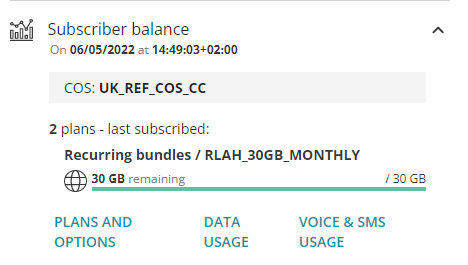
Plans and options
For further details, go to the Plans and Options Tab

For each bundle, you can find information about:
– the “current value” or remaining allowance on your bundle
– the dates of subscription, activation, expiration, and renewal of your bundle
Managing bundles
To display further details about your bundle, you can click on the arrow next to the bundle name: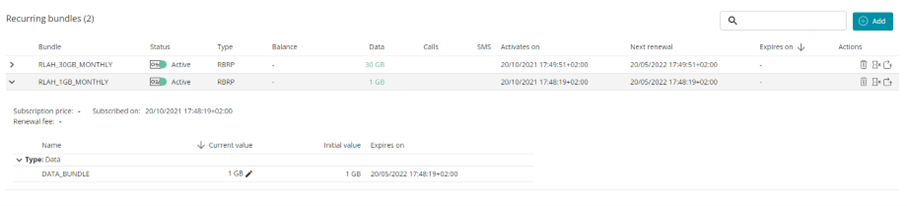
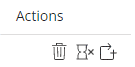
You can manage your bundle in different ways:
– delete the bundle – it will expire straight away
– stop the renewal of a recurring bundle – it will expire at the current period expiration date
– add a 1GB Add-on if you have used up all your bundle in the month.
Switching
To upgrade or downgrade a recurring bundle, simply choose a new recurring bundle. It will automatically switch upon the renewal date of the current bundle.

Switching works for all bundles within the same exclusion group (an exclusion group defines which bundles are mutually exclusive, i.e. two bundles within the group cannot be subscribed at once).
For all RTCP offers, all recurring bundles are by default within the same exclusion group.
For RTCP+ offers, please contact your account manager about defining exclusion groups on your offer.